


Afterpay: Pay over time
4.071.00K Reviews
App Specs
- Version
- 1.142.0
- Updated On
- License
- Free
- Downloads
- 10,000,000+
- Developer
- Afterpay
- Categories
- Shopping
- Platform
- Android, iOS
Screenshots


 Analysis by AppCompare
I judge a payment app less by how appealing a purchase looks and more by how clearly it helps me understand the commitment afterward. That is where Afterpay: Pay over time has to earn its place: it can make a purchase feel easier to manage, but it still asks me to keep track of money leaving my account later. I find it most useful when I already know what I need, have checked the full cost, and want to spread the payments without losing sight of them.
Quick access, with a pause before checkout
For a shopping app, speed is not just how quickly a screen opens. It is also whether I can find a retailer, understand the payment schedule, and make a considered choice without getting swept along by browsing. Afterpay is free, comes from developer Afterpay, and is listed for users aged Everyone. Its current version is 1.128.1, and its minimum OS requirement is 7.0. Those details make it broadly approachable, though I would still check that my device’s software and the app itself are up to date if anything feels sluggish.
My practical advice is to treat the app as a way to inspect an option, not as a reason to buy. Before opening a checkout, decide the maximum total you are comfortable paying and check whether the item is genuinely needed. Splitting a cost can soften the immediate hit, but it does not make the total smaller. That small pause is especially useful when browsing suggestions or store pages starts turning a planned purchase into several tempting extras.
Busy shopping sessions and payment planning
The app is likely to feel most useful when I am comparing a few planned purchases across retailers or checking what payments are coming up. The original appeal is the ability to pay in installments rather than all at once; the less obvious task is looking at those commitments together. If I am shopping for clothing, household supplies, or a replacement accessory, I would make a short list first, then use the app to check whether the retailers I already have in mind are available. That keeps discovery from becoming a substitute for budgeting.
For example, imagine I need a replacement pair of shoes before a busy week. I can browse relevant stores, compare the complete prices, and consider whether installments fit alongside rent, groceries, and other scheduled expenses. I would not judge affordability by the first payment alone. The useful question is whether every later payment will still be comfortable on its due date, including if another routine bill lands at the same time.
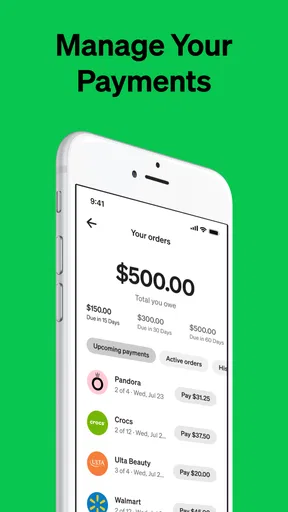
That approach also helps when several plans overlap. A spending overview and upcoming-payment view, as described in the original experience, are more valuable when checked before placing another order, rather than after. I would use them as a prompt to stop and review, not as permission to spend up to a displayed limit. A limit can indicate what may be available, but it is not the same thing as money I have budgeted for shopping.
Reliability means knowing what to check
My impression of the workflow in the original review was that navigation and transactions felt straightforward, and that reminders helped make due dates easier to follow. That is encouraging for ordinary use, but I would still verify the payment schedule at checkout and keep an eye on the account afterward. A reminder is a helpful backup, not a replacement for checking that the amount and date fit my own calendar.
Worth Reading Before You Choose

EA SPORTS FC Mobile 26 Is a Bigger Football Game, but It Takes Time

Flipboard Shows What News Apps Must Do Beyond the Feed

Switching to Android Auto Means Rethinking Your Driving Routine

Google Calendar Makes a Crowded Week Easier to Manage

Ludo King Makes the Most of the Minutes Between Plans

Baby Panda World Brings Quick Play to Modern Phones, but Its Game Library Feels Busy
If a payment or order does not look right, I would first review the details in the app and the retailer’s order information, then contact support through the available help route if the issue remains. It is sensible to keep relevant order details handy so I can explain the problem clearly. No payment service can remove the need to check whether a purchase was completed or whether a concern relates to the order or the payment plan, and I would avoid placing the same order again until I understand what happened.
There is also a useful difference between a smooth checkout and a good financial decision. A fast transaction can be convenient, but it gives me less time to reconsider unless I deliberately create that pause. When I am tired, shopping impulsively, or uncertain about the item, I would leave it in the basket and return later rather than using installments to make the choice feel easier.
Where it fits among shopping alternatives
Compared with paying the full amount at once, installments can make the timing of a planned purchase easier to handle, but paying upfront is simpler: there are no later payments from that purchase to remember. A credit card may suit someone who already manages its statement carefully, while a debit card or ordinary checkout is often clearer for someone who wants the purchase to leave their budget immediately. I see Afterpay as an additional way to pay, not an automatic upgrade over those options.
It is a better fit for someone who can track dates, has enough room in the budget for the entire purchase, and prefers dividing payments for cash-flow reasons. I would skip it if I am relying on future income that is uncertain, already struggling to meet regular expenses, or tempted to buy more because the first installment looks manageable. If simplicity matters more than spreading a cost, paying in full is the cleaner choice.
How It Works
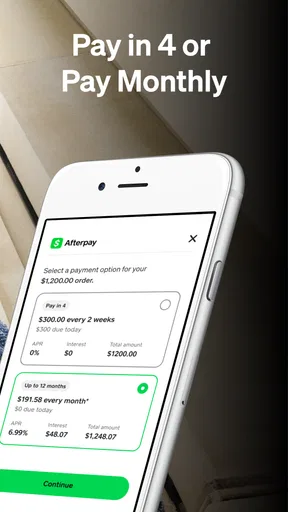
So, what’s the deal with Afterpay? It’s pretty much a game changer in the "buy now, pay later" world. You grab what you want now and pay it off in four equal installments, interest-free. Yes, you heard me right—interest-free. You break up your payments into bi-weekly chunks, making it super manageable. It’s like having your cake and eating it too, without the sugar crash.
Smooth Setup
Getting started with Afterpay is a breeze. You download the app, sign up with a quick registration, and you’re ready to roll. It integrates seamlessly with tons of retailers, both online and in-store. The app interface is clean and intuitive, which is a huge plus for those of us who aren’t tech wizards. I found navigation to be straightforward, and the payment reminders are a lifesaver for keeping track of due dates.
Shopping Flexibility
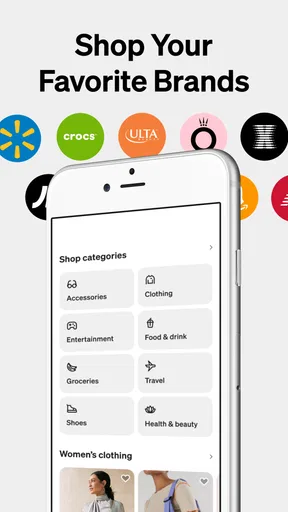
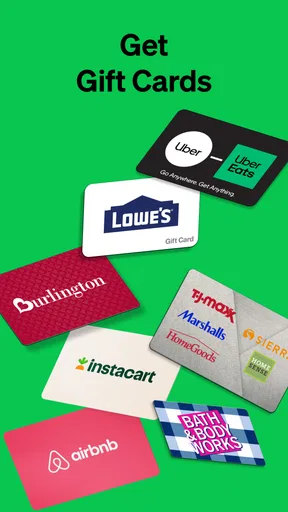
One of the coolest features? It’s accepted at a wide range of stores. From fashion to electronics, Afterpay has you covered. The app even lets you browse stores directly, so it’s like having a shopping assistant right on your phone. I tried it out at a few places, and it was smooth sailing all the way. No hiccups, just quick, easy transactions.
Keeping Track
Worried about overspending? Don’t be. Afterpay has a nifty feature that shows your spending limits and upcoming payments, helping you stay on top of your finances. I appreciated this because it’s easy to get carried away when you’re shopping without the immediate sting of payment. The app gives you a snapshot of your spending habits, which is a real eye-opener.
Community and Support
Another thing I love is the community vibe. You’re not alone if you hit a snag. The customer support is responsive, and the app’s FAQ section is pretty robust. I had a minor issue with a payment once, and the support team was quick to assist, which is always a relief.
Performance in perspective
Afterpay sits in the shopping category, and its broad audience is reflected in its reach: it has more than 10 million installs and an average rating of 4.0 from around 167,000 ratings, alongside roughly 70,000 written reviews. Those figures suggest that many people use it, but they do not tell me whether it will suit my habits. I would pay more attention to whether I can comfortably manage scheduled payments than to popularity alone.
As for resource demands, I would not assume that a shopping app needs a powerful device, but I also would not promise identical speed on every phone. A weak connection, an older operating system, or a retailer’s own checkout can affect how responsive a shopping session feels. If a page stalls, I would check the connection and try again before assuming the payment itself has failed. Avoid tapping repeatedly when a checkout is loading; first confirm the order status to reduce the chance of creating confusion.
The app is most compelling when I want to browse a participating retailer and keep a clear view of what I owe next. It is less compelling if I want a general-purpose budgeting tool, if I prefer every purchase to be settled immediately, or if I need more flexibility than a set installment schedule offers. In those cases, a regular card payment or a dedicated budget routine may be easier to understand and control.
A more deliberate way to use it
One practical habit is to review existing upcoming payments before starting a new shopping session, then decide on a spending ceiling that includes the whole order. Another is to compare the same item’s total cost and delivery details at the retailer before choosing a payment method; convenience at checkout should not be the only deciding factor. If I am buying several things, I would add them up first rather than assessing each installment in isolation.
I would also separate planned essentials from browsing for treats. A necessary replacement can be easier to evaluate against a budget than an unplanned purchase prompted by a sale or a tempting recommendation. If the total would be uncomfortable when paid in full, I would take that as a reason to reconsider, not automatically as a reason to split it up. This is the main trade-off: installments can help organize timing, but they can also make spending feel lighter than it is.
In conclusion, Afterpay: Pay over time is a fantastic tool for anyone looking to manage their spending more effectively. It combines convenience, flexibility, and a smart way to shop without the immediate financial burden. So next time you’re out there eyeing that must-have item, give Afterpay a whirl. It might just become your new best shopping buddy.
Pros
- Interest-free payments available.
- User-friendly interface design.
- Wide range of partnered stores.
- Quick and easy account setup.
- Real-time spending alerts.
Cons
- Requires linking to a bank account.
- Late fees can apply if missed payments.
- Not available for all merchants.
- Spending limits may vary.
- Customer support can be slow.
FAQs for Afterpay: Pay over time
What is Afterpay and how does it work?
Afterpay is a financial technology service that allows you to make purchases and pay them off in four interest-free installments. You can shop both online and in-store at participating retailers. Once you select Afterpay at checkout, you'll pay 25% upfront and the remaining balance is automatically deducted from your account every two weeks.
Are there any fees associated with using Afterpay?
While Afterpay does not charge interest on purchases, late fees may apply if you miss a payment. These fees vary by region, so it’s important to check the terms in your area. Staying on top of your payments ensures there are no additional costs beyond the original purchase price.
Can anyone use Afterpay, or are there eligibility requirements?
To use Afterpay, you must be at least 18 years old, have a valid debit or credit card, and be a resident of a country where Afterpay is available. Additionally, Afterpay may perform a soft credit check to assess your eligibility, but this does not impact your credit score.
How does Afterpay affect my credit score?
Using Afterpay does not directly affect your credit score, as they do not report to credit bureaus. However, missing payments could indirectly impact your credit if Afterpay refers the debt to a collection agency. It’s crucial to maintain timely payments to avoid any potential negative consequences.
What happens if I can't make an Afterpay payment on time?
If you’re unable to make a payment on time, Afterpay offers a grace period but may apply late fees. It’s advisable to contact Afterpay customer service to discuss your situation. They may offer alternative solutions to help you manage your payments without incurring penalties.


